Why does the cashback extension sometimes not show an offer?
You open a shop expecting the cashback card, but instead of the "Activate cashback" button, you only see a brief note. This is not a glitch. The extension intentionally holds back because another partner referred you to the shop first.
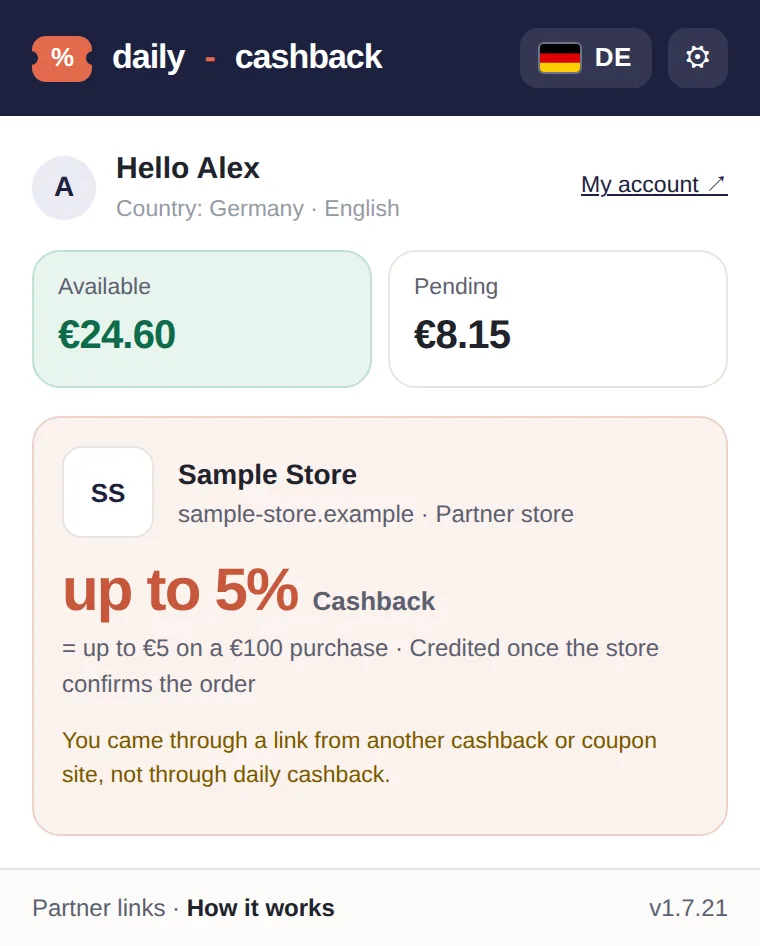
Example with a made-up store: if you came through another site's link, the extension only shows this note and no button to activate.
The reason behind it
If you enter a shop via a link from another cashback or coupon site, that partner has mediated your visit. If our extension offered its own cashback now, it could overwrite their referral. That would be unfair, and affiliate networks forbid it. Experts call this holding back a "stand-down." Awin mandates in its Code of Conduct for Publishers that extensions must recognize third-party referrals and refrain from showing overlays or overwriting tracking.
How the extension detects this
- By partner network identifiers in the shop's URL, such as Awin, CJ, or Impact
- By redirects through these networks' addresses
- By the fact that you arrived directly from another cashback or coupon site
90 minutes, for the entire shop
Our pause lasts 90 minutes from the last external partner link. It applies to the shop, not just a single tab. Closing the tab does not lift it, as that would make the rule easy to bypass. After that, the extension shows cashback and coupons as usual.
Shopping via us anyway
If you prefer to shop via daily-cashback.info, open the shop page on our site and click on the shop there. That is your conscious choice, and the extension will then show "Cashback active".
In short
The pause protects the partner who brought you to the shop first. How other extensions handle this is explained in our comparison with Honey, TopCashback, and Rakuten.
This article is part of our series on transparency and control in our browser extension. You can find the overview of all principles under No automatic cashback: You decide with a click.